A vertical slice can look healthy on a status slide and still be empty where players live. Combat resolves. Inventory works. Dialogue branches. Then someone boots the build and realizes there is nowhere to walk, no town to enter, and no arena that looks like the game you promised. That is the gap an ai map generator is supposed to close for 2D teams, and it is the gap SpriteFlow targets when a milestone still shows gray planes where map screens should be.
I am writing this from the producer side of a narrative RPG that kept passing systems checks while failing the honesty check. Our milestone language said “playable slice.” What we had was systems with temporary tiles. The claim worth testing skips pretty-continent demos. It asks whether a structured map form can turn a fake milestone into screens you can put in front of a publisher without apologizing for placeholders.
Why Graybox Maps Lie About Progress
Systems work is easy to demo. You press buttons and something happens. Map screens are quieter and easier to defer: “we will paint the overworld after combat feels good.” In practice that sentence means the slice still uses a flat color field, a borrowed tileset, or a sketch that would never ship. Reviewers react to place first. If the world looks unfinished, they do not celebrate your inventory polish.
On our last checkpoint call I watched a partner scroll past a clean quest log and stop on a blank travel screen. The conversation shifted from design praise to schedule doubt in under a minute. That is the real cost of empty maps: not art vanity, but trust. Once a partner thinks the world is vapor, every other finished system looks like a prop.
The Milestone Checklist That Exposed Us
We kept a one-page checklist for “slice complete.” It had combat, save, dialogue, and one quest loop. Maps were a footnote: “placeholder OK.” After that call I rewrote the footnote into a hard gate. No travel screen, no town, no battle backdrop in the target art language meant the slice was not done, even if every system unit test was green. That rewrite forced a tool search instead of another week of polite grayboxes.
What The Partner Saw That We Did Not
Inside the team, gray looked like progress because we knew what it stood for. Outside the team, gray looked like missing scope. The partner asked whether the snow route even existed. We said yes and pointed at a design doc. They wanted a screen. That mismatch is why I now treat map deliverables as evidence, not decoration, before any external review.
Old Escapes That Still Leave Empty Screens
Commissioning a cartographer per screen fixes beauty and destroys schedule. A fantasy map maker built for tabletop gives you one gorgeous overworld and nothing for interiors, side-on battle art, or tactics grids. Hand-tiling in the engine teaches craft and burns the week you needed for narrative QA. We tried all three in miniature. Each one either delayed the next call or left the same honesty problem: the build still could not show the places the story claimed existed.
The Afternoon Wasted On One Pretty Continent
I wasted an afternoon in a tabletop-style map tool making a continent the narrative lead loved. It had coastlines, inked mountains, and fake place names. It did not give us a town street plate, a dungeon floor, or a side-on battle backdrop. When I opened the build with that plate as a travel screen, combat still opened on a flat gradient. I deleted the continent from the milestone folder the same night because it would never clear QA as a full slice package. That single discard is what pushed me toward a tool that treats map type as a first-class control instead of one fantasy silhouette.
How The Map Form Turns Place Into Deliverables
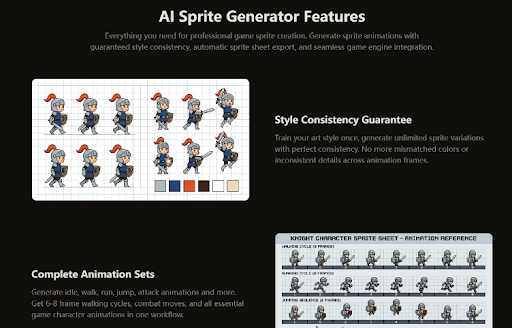
SpriteFlow’s map workflow is a single form that behaves like production, not like a prompt toy. You pick a map type first. The form then reshapes itself: aspect defaults shift, roughly 16:9 for a world map and 4:3 for a tactics arena, and toggles such as place labels or a grid overlay only appear when that type needs them. That adaptation mattered more than any slogan, because it stopped us from generating the wrong camera for the wrong screen.
After type, you lock an art-style preset, optionally add biome and terrain chips, drop reference images if you have a look locked already, and generate. Output lands as a PNG sized for the chosen aspect, ready to drop into an engine as a background or texture. Generation runs on GPT Image and finishes in roughly a minute. None of that replaces art direction. It replaces the week where the slice had systems and no places.
| Slice screen | Map type we used | Why graybox failed here |
| Travel / overworld | World Map | Partners judge scope from the travel plate |
| First town | Town | Story beats need streets, not a colored square |
| Dungeon beat | Dungeon | Exploration pitch dies without corridors |
| Turn-based fight | Battle Background | Side-on combat needs its own camera |
That table is the producer artifact I keep next to the milestone doc. It is also where a second pass with an ai map generator stopped being optional: each row is a different perspective template, so one pretty overworld cannot stand in for the rest.
What Changed After We Locked Type First
In my testing, the first failed session ignored the type picker and tried to force one prompt to cover travel and combat. The images looked busy and wrong in both contexts. Locking type first, then a 32-bit pixel preset, then one Snow biome chip for the opening town, produced screens we could put in the build the same day. I still spent an evening cleaning edges in the pixel editor. That evening was cheaper than another checkpoint apology, and cheaper than the continent afternoon that never touched combat.
Keep Checkpoint Maps On The Free 1K Tier
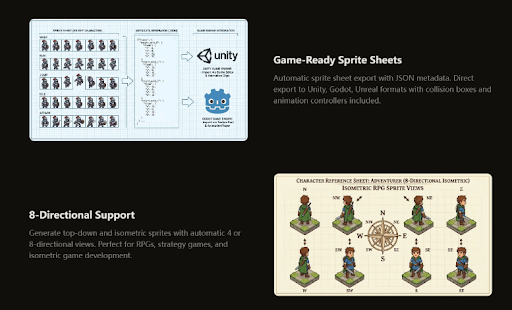
For external reviews I stay on the free 1K tier at 5 credits per map while the layout is still moving. In our pipeline that week is about place existence, not retina detail. When a screen survives narrative QA and actually ships in the slice build, we revisit resolution. Mixing that habit up is how teams burn Premium credits on throwaway travel drafts they will replace tomorrow.
Verdict When The Slice Must Show Places
If your milestone language still treats maps as decoration, rewrite it before you buy more systems time. A playable slice without shippable places is a performance for the team, not evidence for a partner. SpriteFlow is useful when the blocker is empty screens across several map kinds, not when you already have a finished cartography pipeline and only need polish. Use it to make the next call show towns and arenas instead of gray honesty debt.