Key art for a game trailer is already a decision, and a five-second pan is how that decision gets tested in motion. The face on the poster, the weapon silhouette, and the logo lockup were signed before anyone asked for movement. If the pan invents a second costume or slides the logo, the still was the better asset. On Seedance API the composer for Seedance 2.5 shows the price of that pan before a file exists: at duration 5, the required-credits line read 200 marked down to 150 at 480p, 440 marked down to 330 at 720p, and 1,100 marked down to 825 at 1080p, each with a 25 percent off tag. The button underneath stayed Upgrade to generate. This review is about that quote, not about a finished trailer.
Homepage composer with navigation, title, and the working panel loaded.
Studios already know the old cost. A trailer board used to burn a day on one camera move because the approved still could not be touched, and every new frame had to be drawn or filmed again. A credit quote does not remove that rule. It tells you, before the export, whether the higher resolution is a real check or a number that looks serious on a slide.
Key Art Breaks Before The Camera Moves
The failure mode on a game still is specific. A character facing three-quarters, a readable weapon, a background that does not fight the logo. Motion makes those three fight each other. A slow push can keep the face. A fast orbit often loses the weapon edge and then the face follows. The still is the test of whether the move was worth attempting. If the first preview cannot name the same character as the key art, the resolution setting is irrelevant.
That check is visual, and it is also a reject rule. A trailer frame that looks lively in a small player and wrong next to the key art does not go to the publisher. The wrongness is ordinary: an eye drifts, a strap changes side, the logo on the chest becomes a texture. None of that is fixed by jumping from 480p to 1080p. Higher resolution makes the mistake easier to see. It does not invent a correct costume.
A Pan Used To Cost A Full Board
Before a quote like this existed, the cost sat in time. One approved pose, a layout pass, a lighting pass, and then a note that the camera should drift left. If the drift broke the silhouette, the board came back and the afternoon went to the same pose. Teams learned to lock the still and treat motion as a separate ask, with its own budget. The habit is still the right one. What changed is that a five-second attempt now prints a credit number before anyone redraws the pose.
Lock The Pose Then Ask For Motion
The order is the whole method. The pose is chosen from key art. The move is one sentence: a slow push, or a small turn, not a new action. Duration on the composer I opened sat at 5, with aspect ratio on adaptive and resolution buttons for 480p, 720p, and 1080p. Leaving duration alone is how the three quotes stay comparable. Changing duration and resolution in the same click mixes two prices into one argument.
The Quote Moves When Resolution Changes
Seedance API, on Seedance 2.5 with the provider set via Auto, repriced the same five-second setup as soon as the resolution button changed. I did not generate the clip. I read the required-credits line. At 480p it showed 200 with 150 beside a 25 percent off tag. At 720p it showed 440 with 330 and the same tag. At 1080p it showed 1,100 with 825 and the same tag. The header chip, still logged out, showed 10 credits. The generate control never became a download. It kept reading Upgrade to generate.
Bullet Time workspace on Seedance 2.5 at 480p, with the 150 credit line.
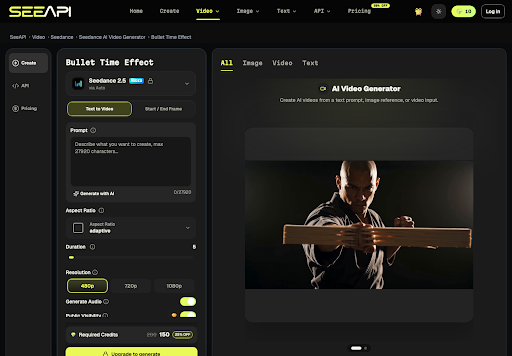
The arithmetic is the useful part, and it is simple enough to do on the quote itself. 330 divided by 150 is 2.2. 825 divided by 150 is 5.5. A 720p check costs a bit more than double the discounted 480p line. A 1080p check costs five and a half times that 480p line, for the same five seconds, on this model, in this session. The composer printed that number when the only control that moved was resolution, and the figure is a quote rather than a yearly plan.
Read The Discounted Figure Not The Strike
Each line shows two figures. The higher one is struck in the layout, and the lower one sits with the 25 percent off tag. A budget argument that uses 200, 440, and 1,100 is describing the pre-discount print. A budget argument that uses 150, 330, and 825 is describing what the tag is offering. Pick one column and stay there. Mixing 200 with 825 makes the jump look larger than the discounted column, and mixing 150 with 1,100 does the opposite. For a trailer desk the discounted column is the one next to the tag, so that is the column to compare.
| Resolution | Duration | Printed credits | With the 25 percent tag |
| 480p | 5 seconds | 200 | 150 |
| 720p | 5 seconds | 440 | 330 |
| 1080p | 5 seconds | 1,100 | 825 |
The table is a reading of one composer state: Seedance 2.5, duration left at 5, text-to-video mode. It is not a price for every model on the site, and it is not a promise that a later login will show the same strike-through. If the tag disappears, the comparison has to be redone. The method is the part worth keeping: change one control, read the line, then decide if the still even survived.
A Desk Check Before Anyone Exports
The quote is a gate, not the review. A game desk still has to look at the picture. The cheap resolution is the right place to learn that the face failed. The expensive resolution is a poor place to discover the same failure, because the credits are already the story and the still is still wrong.
- Set the approved key art beside the composer and leave duration at 5.
- Read the 480p line, discounted column, and run the pose check there first.
- Reject the move if the weapon edge or the face cannot be named against the poster.
- Only then compare 720p at 330 and 1080p at 825 against that same pose.
- Do not treat Upgrade to generate as a finished export. It means the quote is not a file yet.
Step two is where time used to disappear. A team that opens 1080p because the trailer spec says 1080p spends 825 discounted credits learning what 150 would have shown about the face. The spec can still demand 1080p for the master. It does not demand that the first look at a risky pan happen there. Seedance API makes that split visible because the three buttons reprice the line immediately.
Where A Higher Resolution Still Fails
A 1080p quote does not repair a bad pose, and it does not cover a logged-out chip that shows 10 credits. The 150 line at 480p is already above that chip, so the session I opened could display the price and could not spend it. Audio and public-visibility toggles sit on the same form, and this pass did not price them separately. A master that still needs a human to match the poster is not finished when the credit line looks precise.
Spend The Quote On The Approved Still
The review ends on a narrow use. Five seconds, one pose, resolution chosen after the face survives the cheap line. 720p at 330 is the middle check when the silhouette is already right and the trailer spec is not yet the master. 1080p at 825 is a delivery check, not a place to explore camera ideas. If the still fails, the credits were the smaller loss. The poster was the asset, and it is still the one the publisher can defend.
A different page on the same site: face swap starts from a clip plus one reference photo.
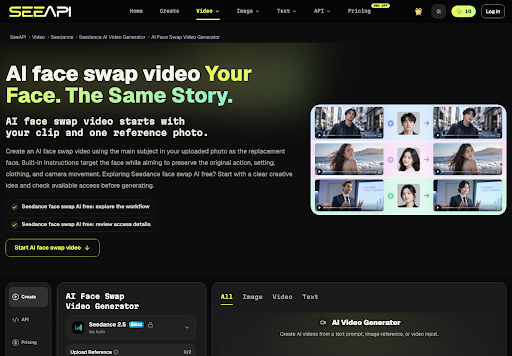
Seedance API is useful here as a quote you can read before a file exists. It is a weak place to invent a new character, and it is silent on whether a later account will keep the 25 percent tag. Keep the key art in the frame, keep duration fixed while you compare resolutions, and let a wrong face stop the pan before the line says 825.